- 08/24/2026
- Simba Infotech
- 0
Introduction
When people search for a product or service near them, Google Maps is often the first place they look. Whether they need a restaurant, clinic, retail store, or service provider, most customers choose businesses that appear at the top of the search results. That’s why achieving a higher Google Maps ranking has become an essential part of local SEO and a successful Digital marketing strategy. Businesses that rank well on Google Maps enjoy greater visibility, build trust with potential customers, and receive more phone calls, website visits, direction requests, and ultimately, more sales.
If your competitors consistently appear above your business, it doesn’t necessarily mean they offer better products or services. In many cases, they simply have a more optimized Google Business Profile and stronger Google Maps SEO practices. Fortunately, these rankings can be improved with the right approach.
In this guide, you’ll discover:
- Why some businesses rank higher on Google Maps than others.
- The key Google Business Profile ranking factors that influence your Google Maps ranking.
- Practical strategies to improve Google Maps ranking and attract more local customers.
- Common mistakes to avoid for long-term local business SEO success.
By the end of this article, you’ll have a clear roadmap to rank higher on Google Maps and strengthen your online presence.
Why Local Businesses Need a Strong Presence on Google Maps
Today, most customers turn to Google before visiting a store, booking a service, or making a purchase. Whether they search for “restaurants near me,” “best digital marketing agency,” or “mobile app development company,” Google Maps often displays the most relevant local businesses first. This makes a strong Google Maps ranking one of the most valuable assets for any local business looking to attract nearby customers and stay ahead of the competition.
How Customers Use Google Maps to Find Nearby Businesses
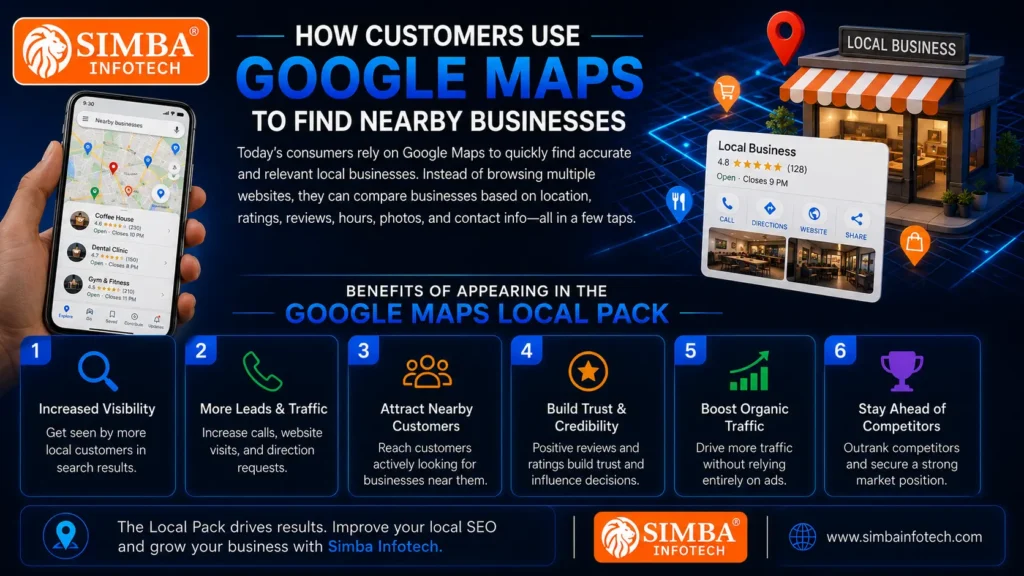
Today’s consumers rely on Google Maps to quickly find accurate and relevant local businesses. Instead of browsing through multiple websites, they can instantly compare businesses based on location, ratings, reviews, business hours, photos, and contact information. Businesses that invest in Google Maps SEO and Google Business Profile optimization are more likely to appear in these searches, making it easier for potential customers to discover and choose their services.
Benefits of Appearing in the Google Maps Local Pack
The Google Maps Local Pack refers to the top three business listings that appear in local search results. Securing a position in this section offers several advantages, including:
- Increased visibility in local search results.
- Increase phone inquiries, website traffic, and navigation requests.
- Higher chances of attracting nearby customers.
- Greater credibility through reviews and ratings.
- Drive more organic traffic without depending entirely on paid advertising.
- Gain a competitive advantage over lower-ranking businesses.
Appearing in the Local Pack can significantly improve your local business SEO performance and support your overall digital marketing efforts.
Impact on Trust, Visibility, and Conversions
Customers are naturally more likely to trust businesses that appear at the top of Google Maps. A well-maintained profile with positive reviews, accurate business information, quality photos, and regular updates creates a strong first impression. This not only increases your online visibility but also encourages more people to contact your business, visit your website, or request directions.
As a result, effective Google Maps optimization doesn’t just help you rank higher on Google Maps—it also drives more qualified leads, improves customer confidence, and increases conversions. When combined with a well-optimized website and a comprehensive digital marketing strategy, it becomes a powerful tool for long-term business growth.
How Google Maps Ranking Actually Works
Many business owners assume that a higher Google Maps ranking depends only on customer reviews or the size of the business. In reality, Google’s algorithm evaluates multiple signals before deciding which businesses deserve higher visibility. Understanding these Google Business Profile ranking factors is the first step toward improving your Google Maps ranking and building a stronger local SEO strategy.
Google primarily considers three key ranking factors when displaying businesses in Google Maps:
Relevance
Relevance refers to how closely your business matches a user’s search query. Google analyzes your Google Business Profile, including your business category, description, products, services, and keywords, to determine whether your business is the right fit for what the user is searching for. A complete and well-optimized profile increases your chances of appearing in relevant local searches.
Distance
Distance measures how close your business is to the location mentioned in the search or the user’s current location. While you cannot change your physical location, you can improve your Google Maps SEO by accurately listing your business address, service areas, and maintaining consistent business information across the web.
Prominence
Prominence indicates how well-known, credible, and trusted your business is both online and offline. Google considers factors such as:
- The quantity and quality of customer reviews.
- Your overall review rating.
- Website authority and local business SEO performance.
- Local backlinks and business directory listings.
- Regular updates, photos, and activity on your Google Business Profile.
- Customer engagement, including clicks, calls, and direction requests.
The stronger these signals are, the better your chances of ranking higher on Google Maps.
Why Google Maps Rankings Differ from Traditional SEO
Although both Google Maps SEO and traditional SEO aim to increase online visibility, they use different ranking signals. Traditional SEO mainly focuses on optimizing website content, backlinks, page speed, and technical performance to rank in organic search results. In contrast, Google Maps optimization gives significant importance to your Google Business Profile, customer reviews, location relevance, and local trust signals.
For the best results, businesses should combine local SEO, an optimized website, and a strong digital marketing strategy. When these elements work together, they significantly improve your ability to rank higher on Google Maps and attract more qualified local customers.
Signs Your Competitors Are Beating You on Google Maps
If your business isn’t getting enough calls, website visitors, or local inquiries, there’s a good chance your competitors are performing better on Google Maps. Businesses with a stronger Google Maps ranking often attract more attention because they have optimized their online presence and invested in effective local SEO strategies. Identifying where your competitors have an advantage is the first step toward improving your own Google Maps SEO performance.
Here are some common signs that your competitors are ranking ahead of you:
They Appear in the Top 3 Google Maps Results
One of the clearest signs is that your competitors consistently appear in the Google Maps Local Pack—the top three business listings displayed for local searches. These businesses receive the majority of clicks, calls, and direction requests because customers usually choose one of the first options they see. If your business rarely appears in these top results, it’s time to focus on Google Maps optimization.
They Receive More Customer Reviews
Customer reviews are one of the most important Google Business Profile ranking factors. If your competitors have significantly more genuine reviews, Google may consider them more reliable and relevant. Businesses with a steady flow of positive reviews are also more likely to earn customer trust and improve their Google Maps ranking over time.
They Have Better Ratings
It’s not just the number of reviews that matters—your overall rating also plays an important role. A business with a high average rating is more attractive to potential customers and often receives more clicks than listings with lower ratings. Better ratings can improve both your online reputation and your local business SEO performance.
Their Google Business Profile Is More Complete
A fully optimized Google Business Profile provides Google with valuable information about a business. If your competitors have added accurate business details, categories, services, products, business hours, high-quality photos, FAQs, and regular updates, they are sending stronger relevance signals to Google. A complete profile also creates a better experience for potential customers.
They Appear for More Local Search Queries
Your competitors may rank for a wider range of local keywords, allowing them to reach more potential customers. For example, instead of appearing only for one service, they may also rank for related products, nearby locations, and industry-specific searches. This is usually the result of strong Google Business Profile optimization, effective Google Maps SEO, and a well-planned digital marketing strategy that supports their local online presence.
Recognizing these signs helps you understand where your business is falling behind. The good news is that with the right improvements in local SEO, profile optimization, and customer engagement, you can gradually rank higher on Google Maps and compete more effectively in your local market.
Top Reasons Your Competitors Rank Higher on Google Maps
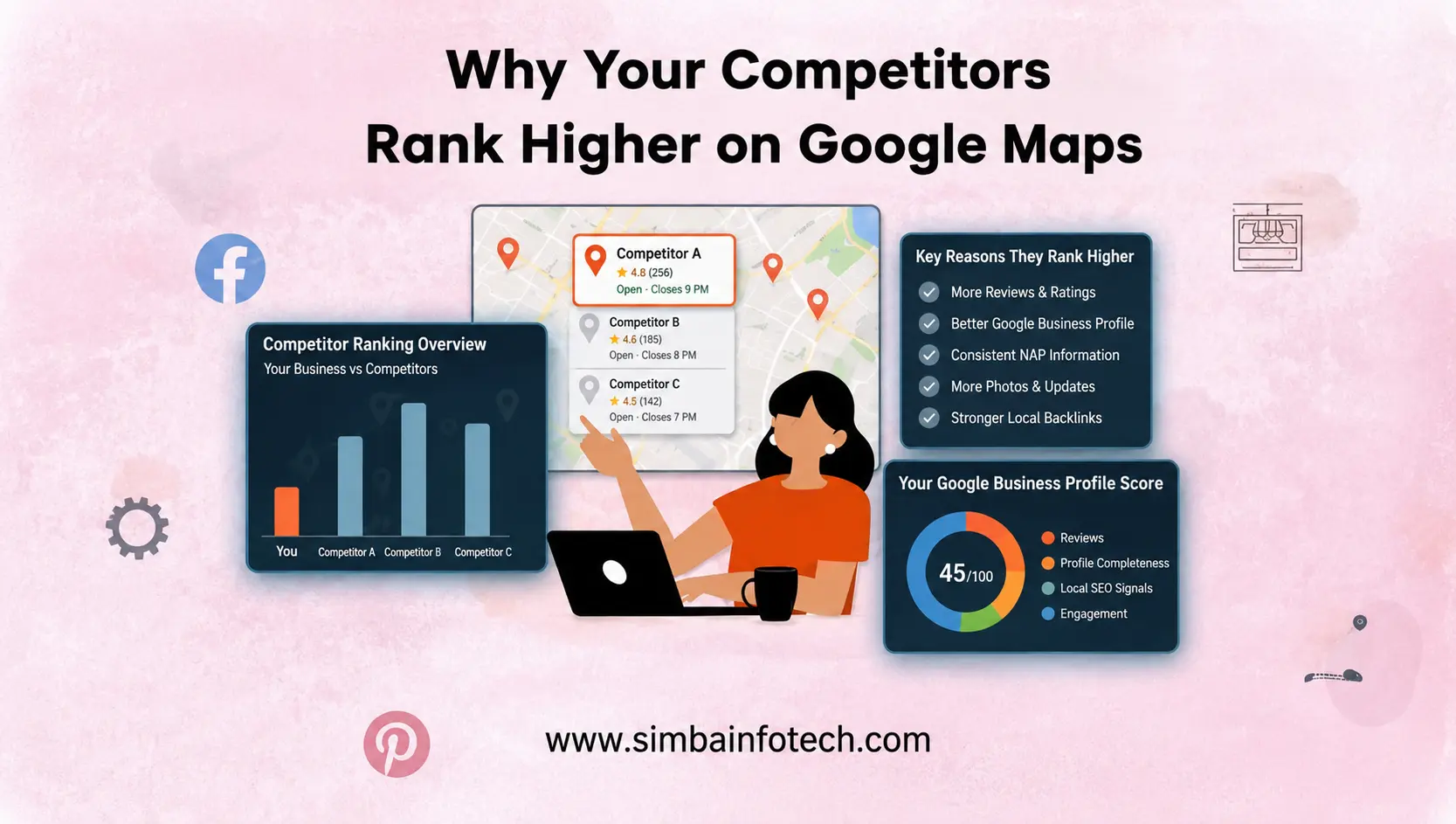
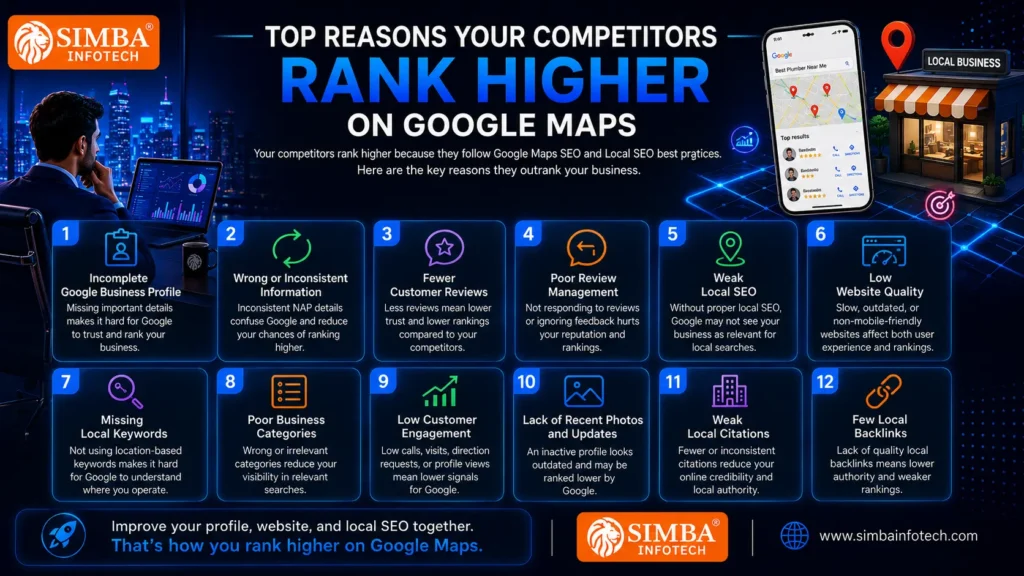
If your competitors consistently appear above your business in Google Maps, it’s usually not because Google favors them. Instead, they have likely invested more time in Google Business Profile optimization, Google Maps SEO, and local SEO best practices. Even small improvements across multiple ranking factors can make a significant difference in your Google Maps ranking.
Below are the most common reasons why your competitors may be ranking higher than your business.
1. Incomplete Google Business Profile
Your Google Business Profile is one of the most important factors for Google Maps optimization. An incomplete profile makes it difficult for Google to understand your business and recommend it to potential customers.
A complete profile should include:
- Accurate business name
- Phone number and address
- Business hours
- Website link
- Business description
- Products and services
- High-quality photos
- Primary and secondary business categories
The more complete and informative your profile is, the greater your chances of ranking higher on Google Maps.
2. Wrong or Inconsistent Business Information
Google values consistency. If your business name, address, or phone number (NAP) differs across your website, social media profiles, business directories, or other online platforms, Google may become less confident about your business information.
To avoid this issue:
- Keep your NAP details identical everywhere.
- Update your business hours whenever they change.
- Ensure your website and Google Business Profile display the same information.
Consistent information strengthens your local business SEO and improves customer trust.
3. Fewer Customer Reviews
Customer reviews are a strong trust signal for both Google and potential customers. If your competitors have more genuine reviews, they are more likely to achieve a better Google Maps ranking.
To increase reviews:
- Ask satisfied customers for honest feedback.
- Make it easy to leave a review.
- Encourage reviews consistently instead of only occasionally.
A steady stream of authentic reviews supports long-term Google Maps SEO success.
4. Poor Review Management
Receiving reviews is only part of the process. Businesses that actively respond to both positive and negative reviews demonstrate professionalism and customer care.
Poor review management includes:
- Ignoring customer feedback.
- Never replying to reviews.
- Responding unprofessionally.
- Failing to address customer concerns.
Regularly engaging with reviews improves customer confidence and supports your overall digital marketing efforts.
5. Weak Local SEO
Without a solid local SEO strategy, even an optimized Google Business Profile may struggle to rank well. Google also evaluates your overall online presence.
Strong local SEO includes:
- Optimized website pages.
- Local keyword targeting.
- Location-specific content.
- Business directory listings.
- Local backlinks.
Together, these signals help improve your Google Maps visibility.
6. Low Website Quality
Your website plays an important role in supporting your Google Maps ranking. If it loads slowly, is difficult to navigate, or isn’t mobile-friendly, both users and search engines may have a poor experience.
A high-quality website should offer:
- Fast loading speed.
- Mobile responsiveness.
- Secure HTTPS connection.
- Clear navigation.
- Valuable and updated content.
- Strong on-page SEO.
A well-optimized website complements your Google Business Profile optimization and strengthens your online authority.
7. Missing Local Keywords
If your business profile and website don’t include relevant local keywords, Google may struggle to understand which searches your business should appear for.
Instead of using only general service terms, naturally include:
- Your primary services.
- Target locations.
- Industry-related keywords.
- Location-based phrases throughout your website and profile.
Using keywords naturally improves both Google Maps SEO and traditional SEO.
8. Poor Business Categories
Selecting the wrong business category can significantly affect your visibility. Google relies on your primary and secondary categories to determine when your business should appear in search results.
Choose categories that accurately represent:
- Your main service.
- Additional services you offer.
- Specialized business activities.
Correct categorization increases your chances of reaching the right audience.
9. Low Customer Engagement
Google also considers how users interact with your business profile. If people frequently call your business, visit your website, request directions, or view your photos, these engagement signals indicate that your listing is valuable.
Higher engagement often leads to:
- Better visibility.
- Increased customer trust.
- Improved Google Maps ranking over time.
10. Lack of Recent Photos and Updates
An inactive profile can make your business appear outdated. Regularly uploading high-quality photos and publishing updates shows Google that your business is active and well-maintained.
Keep your profile fresh by adding:
- Team and office photos.
- Product or service images.
- Customer success stories.
- Business announcements.
- Special offers and events.
Fresh content enhances your Google Maps optimization strategy and keeps customers engaged.
11. Weak Local Citations
Local citations are online mentions of your business on trusted directories and listing websites. These citations help Google verify your business information and improve local credibility.
Focus on:
- Listing your business on reputable directories.
- Keeping business information consistent.
- Updating outdated listings when necessary.
Strong citations contribute to better local business SEO performance.
12. Few Local Backlinks
Backlinks from reputable local websites signal authority and trustworthiness to Google. Businesses with quality local backlinks often perform better in both organic search and Google Maps results.
You can earn local backlinks by:
- Partnering with local businesses.
- Joining local business associations.
- Sponsoring community events.
- Publishing valuable local content.
- Getting featured on local news or industry websites.
High-quality backlinks strengthen your overall digital marketing strategy and increase your chances to rank higher on Google Maps.
By addressing these common issues, you can significantly improve your Google Maps ranking and compete more effectively with businesses in your area. Remember, success doesn’t come from focusing on just one ranking factor—it comes from consistently improving your Google Business Profile, website, and local SEO efforts together.
How to Outrank Your Competitors on Google Maps
Now that you understand why your competitors are ranking higher, the next step is learning how to outperform them. Improving your Google Maps ranking doesn’t happen overnight, but with consistent effort and the right Google Maps SEO strategy, your business can achieve better visibility and attract more local customers. The key is to optimize every aspect of your Google Business Profile while strengthening your overall local SEO and digital marketing efforts.
Here are the most effective ways to rank higher on Google Maps.
1. Complete Every Section of Your Google Business Profile
A fully optimized Google Business Profile helps Google understand your business and increases the chances of appearing in relevant local searches. Leaving important sections incomplete can reduce your visibility.
Make sure your profile includes:
- Business name
- Accurate address and phone number
- Website URL
- Business hours
- Business description
- Products and services
- High-quality photos
- Service areas
- Attributes and amenities
- Appointment or booking links, if applicable
A complete profile builds trust with both Google and potential customers.
2. Choose the Right Primary and Secondary Categories
Your business categories tell Google what your business does. Selecting the most accurate primary category is essential because it has a significant impact on your Google Maps ranking.
For better results:
- Choose a primary category that best represents your core service.
- Add relevant secondary categories for additional services.
- Avoid selecting unrelated categories just to target more searches.
Accurate categories improve the relevance of your business listing.
3. Add High-Quality Photos Regularly
Businesses with updated, high-quality images often receive more clicks, calls, and direction requests. Photos also show Google that your profile is active.
Upload photos such as:
- Office or storefront images
- Team members
- Products
- Services in action
- Completed projects
- Customer experiences
Regular photo updates support effective Google Maps optimization and improve customer engagement.
4. Collect More Genuine Customer Reviews
Customer reviews are one of the strongest Google Business Profile ranking factors. Businesses with consistent positive reviews are more likely to attract both Google and potential customers.
To increase genuine reviews:
- Ask satisfied customers after completing a service.
- Share your review link through email or WhatsApp.
- Make the review process quick and simple.
- Never purchase fake reviews or offer incentives for positive feedback.
Authentic reviews improve credibility and strengthen your local business SEO.
5. Respond to Every Review
Replying to customer reviews shows that you value customer feedback and actively manage your business.
Follow these best practices:
- Thank customers for positive reviews.
- Respond politely to negative feedback.
- Address customer concerns professionally.
- Reply promptly whenever possible.
Active review management builds trust and contributes to a stronger online reputation.
6. Optimize Your Business Description
Your business description should clearly explain who you are, what services you offer, and the areas you serve. It should naturally include relevant keywords without sounding repetitive.
A good description should:
- Explain your core services.
- Mention your target locations.
- Highlight your unique strengths.
- Include relevant local SEO keywords naturally.
A well-written description helps Google better understand your business.
7. Use Local Keywords Naturally
Using location-based keywords helps Google connect your business with nearby customers searching for your services.
Examples include:
- Your city or service area.
- Industry-specific services.
- Nearby locations you serve.
Use these keywords naturally in:
- Your website content.
- Google Business Profile description.
- Service descriptions.
- Google Posts.
Avoid keyword stuffing, as it can negatively affect user experience.
8. Keep Business Information Consistent Everywhere
Consistency is essential for successful Google Maps SEO. Your business information should match across every online platform.
Ensure consistency for:
- Business name
- Address
- Phone number
- Website
- Business hours
Matching information across directories, social media platforms, and your website improves Google’s confidence in your business.
9. Publish Google Business Posts Regularly
Regular Google Business Posts keep your profile active and provide useful information to potential customers.
You can publish updates about:
- New services
- Company news
- Seasonal offers
- Promotions
- Events
- Helpful business tips
Posting consistently demonstrates that your business is active and engaged with its audience.
10. Add Products and Services
Many businesses overlook the Products and Services section of their Google Business Profile. Completing these sections provides Google with additional information about your business and improves relevance for local searches.
Include:
- Detailed service descriptions.
- Product information.
- Pricing (if appropriate).
- Service benefits.
- High-quality images.
This helps customers better understand what your business offers before contacting you.
11. Enable Messaging
Google Business Profile messaging allows potential customers to contact your business directly from your listing. Quick communication improves customer experience and can increase leads.
To make the most of messaging:
- Enable the feature if available.
- Respond quickly to inquiries.
- Provide clear and helpful answers.
- Maintain a professional tone.
Fast responses create a positive impression and encourage customer engagement.
12. Keep Business Hours Updated
Accurate business hours are essential for both customers and Google. Incorrect hours can frustrate customers and reduce trust in your business.
Regularly update:
- Daily operating hours.
- Holiday schedules.
- Special event timings.
- Temporary closures.
Keeping this information current ensures customers receive accurate details and helps maintain a reliable business profile.
Consistency Is the Key to Long-Term Success
There is no single shortcut to rank higher on Google Maps. The most successful businesses consistently improve their Google Business Profile optimization, maintain an active online presence, and invest in local SEO as part of their overall digital marketing strategy. By following these best practices and updating your profile regularly, you can steadily improve your Google Maps ranking, outperform competitors, and attract more local customers over time.
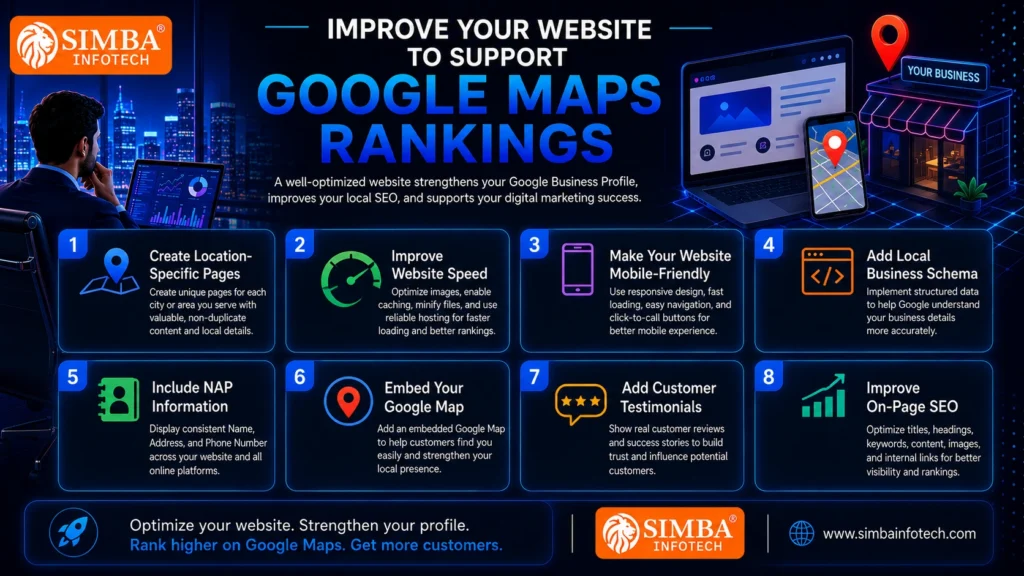
Improve Your Website to Support Google Maps Rankings
While your Google Business Profile plays a major role in Google Maps ranking, your website is equally important. Google uses your website to verify business information, understand your services, and evaluate the overall credibility of your business. A well-optimized website strengthens your Google Maps SEO, improves your local SEO, and supports your broader digital marketing strategy.
If you want to rank higher on Google Maps, your website should provide both search engines and visitors with a fast, trustworthy, and user-friendly experience.
1. Create Location-Specific Pages
If your business serves multiple cities or regions, create dedicated pages for each location instead of listing every area on a single page. Location-specific pages help Google understand where you provide services and increase your chances of appearing in relevant local searches.
Each location page should include:
- The city or service area name.
- Services offered in that location.
- Unique and valuable content.
- Customer testimonials from the area.
- Contact details and directions where applicable.
Avoid copying the same content across multiple pages, as duplicate content can affect your SEO performance.
2. Improve Website Speed
Website speed is an important ranking factor for both users and search engines. A slow-loading website can increase bounce rates and reduce customer engagement, which may indirectly impact your Google Maps optimization efforts.
To improve website speed:
- Compress images without reducing quality.
- Remove unnecessary plugins and scripts.
- Enable browser caching.
- Minify CSS, JavaScript, and HTML files.
- Choose reliable web hosting.
A faster website provides a better user experience and encourages visitors to stay longer.
3. Make Your Website Mobile-Friendly
Most local searches happen on smartphones, making mobile optimization essential. If your website doesn’t display properly on mobile devices, potential customers may leave before contacting your business.
A mobile-friendly website should:
- Adjust to different screen sizes.
- Load quickly on mobile networks.
- Have easy-to-read text.
- Include clickable phone numbers.
- Provide simple navigation and clear call-to-action buttons.
A responsive website improves user satisfaction and supports your local business SEO.
4. Add Local Business Schema
Local Business Schema is structured data that helps search engines understand important details about your business. Although visitors don’t see this information, it helps Google interpret your website more accurately.
Schema markup can include:
- Business name.
- Address.
- Phone number.
- Business hours.
- Website URL.
- Services offered.
- Customer reviews.
- Geographic location.
Implementing schema improves your website’s communication with search engines and strengthens your local search presence.
5. Include NAP Information
NAP stands for Name, Address, and Phone Number. Your NAP information should appear clearly on your website and match the details listed on your Google Business Profile and other online directories.
For best results:
- Display your NAP on the Contact page.
- Include it in the website footer.
- Ensure the information is identical across all online platforms.
- Update it immediately whenever changes occur.
Consistent NAP information builds trust with Google and improves your Google Maps SEO.
6. Embed Your Google Map
Embedding your Google Map on your website makes it easier for visitors to find your business while reinforcing your local presence.
Adding an embedded map offers several benefits:
- Improves user experience.
- Helps customers locate your business quickly.
- Supports local relevance.
- Complements your Google Business Profile optimization.
Place the embedded map on your Contact page or location-specific pages for maximum effectiveness.
7. Add Customer Testimonials
Positive customer testimonials build trust and influence purchasing decisions. They also demonstrate credibility, which supports your overall online reputation.
Include testimonials that:
- Highlight real customer experiences.
- Mention specific services.
- Reference your location when appropriate.
- Showcase measurable results whenever possible.
Authentic testimonials increase customer confidence and strengthen your digital marketing efforts.
8. Improve On-Page SEO
Strong on-page SEO helps search engines understand your website and improves your chances of ranking in both organic search results and Google Maps.
Focus on optimizing:
- Page titles and meta descriptions.
- Heading tags (H1, H2, H3).
- Local keywords used naturally.
- Internal linking between related pages.
- Image alt text.
- High-quality, informative content.
- Clear call-to-action sections.
A well-optimized website works together with your Google Business Profile to improve your Google Maps ranking and overall online visibility.
Your Website and Google Business Profile Should Work Together
Many businesses focus only on optimizing their Google Business Profile, but the best results come when your website and profile support each other. A fast, mobile-friendly, SEO-optimized website with consistent business information sends strong trust signals to Google. Combined with effective Google Maps optimization, local SEO, and a comprehensive digital marketing strategy, your website becomes a powerful tool for attracting local customers and helping your business rank higher on Google Maps.
Build Strong Local SEO Signals
Building strong local SEO signals helps Google recognize your business as a trusted and relevant choice within your service area. While optimizing your Google Business Profile is essential, strengthening your overall online presence can further improve your Google Maps ranking and make it easier for local customers to find your business. These efforts also enhance your digital marketing strategy and support long-term business growth.
Here are some effective ways to strengthen your local SEO signals:
- Get listed in trusted business directories: Add your business to reputable online directories and ensure your business name, address, and phone number (NAP) remain consistent across all listings. Accurate citations improve credibility and support Google Maps SEO.
- Earn local backlinks: Gain backlinks from local news websites, blogs, business associations, and industry-related websites. Quality local backlinks increase your website’s authority and contribute to better Google Maps optimization.
- Join local organizations: Becoming a member of local chambers of commerce, business groups, or professional associations helps build trust and often provides valuable backlinks and local exposure.
- Sponsor community events: Supporting local events, charities, or educational programs not only increases brand awareness but can also earn mentions and backlinks from local websites.
- Create locally relevant content: Publish blogs, case studies, guides, and updates related to your city, community, or local industry trends. Valuable local content helps attract nearby customers and strengthens your local business SEO.
By consistently building these local SEO signals, you increase your chances to rank higher on Google Maps, improve online visibility, and attract more qualified local customers.
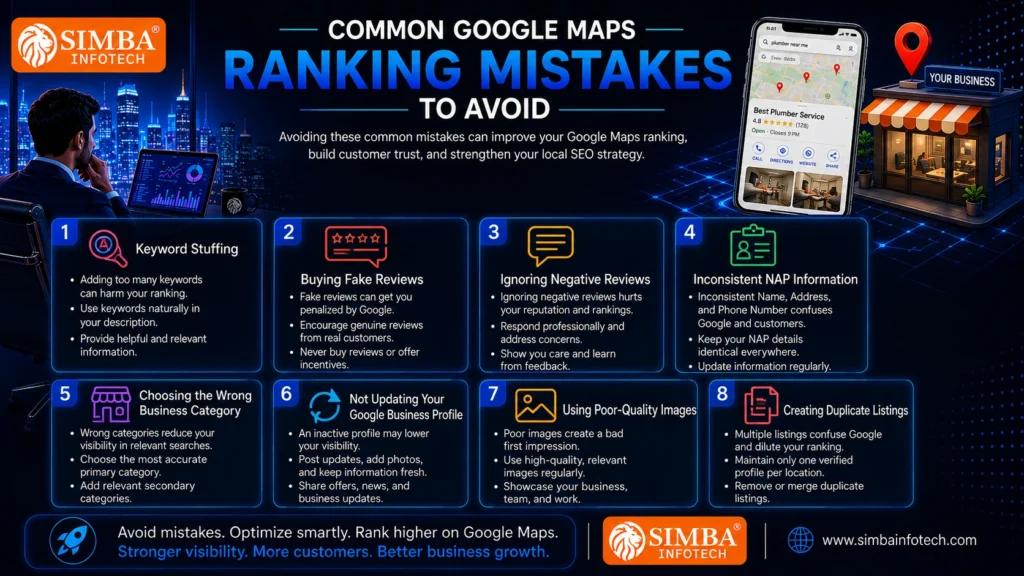
Common Google Maps Ranking Mistakes to Avoid
Improving your Google Maps ranking requires more than just following best practices—it also means avoiding common mistakes that can hurt your visibility and credibility. Even businesses with excellent products or services can struggle to rank higher on Google Maps if they overlook important aspects of Google Maps SEO and Google Business Profile optimization. By identifying and fixing these issues, you can strengthen your local SEO strategy and stay ahead of your competitors.
Here are some of the most common Google Maps ranking mistakes to avoid:
1. Keyword Stuffing
Adding too many keywords to your business name, description, or posts may seem like a quick way to improve rankings, but it can actually have the opposite effect. Google prefers natural, user-friendly content that accurately describes your business.
Instead:
- Use keywords naturally in your business description.
- Focus on providing helpful and relevant information.
- Avoid repeating the same keyword unnecessarily.
2. Buying Fake Reviews
Fake or paid reviews violate Google’s policies and can damage your business’s reputation. Google is becoming increasingly effective at detecting suspicious review activity, which may result in lower rankings or profile restrictions.
For long-term success:
- Encourage genuine reviews from real customers.
- Never purchase reviews or offer incentives for positive ratings.
- Build trust through authentic customer experiences.
3. Ignoring Negative Reviews
Every business receives negative feedback occasionally. Ignoring these reviews can create a poor impression for both customers and Google.
A better approach is to:
- Respond politely and professionally.
- Address customer concerns promptly.
- Show a willingness to resolve issues.
- Learn from customer feedback to improve your services.
Professional responses demonstrate that your business values customer satisfaction.
4. Inconsistent NAP Information
Your Name, Address, and Phone Number (NAP) should be identical across your website, Google Business Profile, social media accounts, and online directories. Inconsistent information can confuse both customers and search engines.
To avoid this mistake:
- Regularly audit your online listings.
- Correct outdated contact details.
- Keep business hours and website links updated.
Consistency strengthens your local business SEO and improves trust.
5. Choosing the Wrong Business Category
Selecting an inaccurate business category can reduce your visibility in relevant searches. Google uses your primary and secondary categories to determine when your business should appear in local search results.
For better performance:
- Choose the category that best represents your primary service.
- Add relevant secondary categories where appropriate.
- Review your categories periodically as your services expand.
6. Not Updating Your Google Business Profile
An inactive profile may signal that your business is not actively managed. Regular updates help keep your listing relevant and informative.
Make it a habit to:
- Publish Google Business Posts.
- Add new photos.
- Update products and services.
- Revise business hours when necessary.
- Share business announcements or special offers.
An active profile supports effective Google Maps optimization.
7. Using Poor-Quality Images
Photos often create the first impression of your business. Low-resolution, outdated, or irrelevant images can discourage potential customers from engaging with your listing.
Use high-quality images that showcase:
- Your office or storefront.
- Products and services.
- Team members.
- Completed projects.
- Customer experiences.
Regularly updating quality photos improves both customer engagement and profile attractiveness.
8. Creating Duplicate Listings
Creating multiple Google Business Profiles for the same business location can confuse Google and dilute your ranking signals. Duplicate listings may also mislead customers and lead to inconsistent business information.
To avoid this issue:
- Maintain only one verified profile for each legitimate business location.
- Remove or merge duplicate listings when possible.
- Keep all business details accurate and up to date.
Focus on Consistency and Quality
Avoiding these common mistakes is just as important as implementing the right optimization strategies. A well-maintained Google Business Profile, consistent business information, genuine customer reviews, and a strong digital marketing approach all contribute to better Google Maps SEO and long-term Google Maps ranking success. By focusing on quality, accuracy, and consistency, you’ll be in a much stronger position to attract local customers and outperform your competitors.
How Long Does It Take to Improve Google Maps Rankings?
One of the most common questions business owners ask is, “How long does it take to improve Google Maps rankings?” The answer depends on several factors, including your competition, the current state of your Google Business Profile, and the effectiveness of your local SEO strategy. While some businesses notice small improvements within a few weeks, achieving a strong and consistent Google Maps ranking typically takes 3 to 6 months of ongoing optimization.
Several factors can influence how quickly your rankings improve, such as:
- The completeness of your Google Business Profile.
- The quality and quantity of customer reviews.
- Your website’s SEO and overall performance.
- Consistent business information (NAP) across all platforms.
- Local backlinks and business citations.
- The level of competition in your area.
During the first few months, you may begin to see increased profile views, more website visits, additional phone calls, and improved visibility in local search results. However, significant ranking improvements usually come from continuous effort rather than quick fixes.
The key to long-term success is consistency. Regularly updating your profile, collecting genuine customer reviews, publishing Google Business Posts, uploading fresh photos, and maintaining a strong digital marketing strategy all contribute to better Google Maps SEO. Businesses that consistently invest in Google Maps optimization and local business SEO are far more likely to rank higher on Google Maps and maintain their position over time.
Google Maps Ranking Checklist
Improving your Google Maps ranking takes steady optimization, not a one-time setup. Use this checklist to strengthen your Google Business Profile, support local SEO, and improve your chances to rank higher on Google Maps.
Google Maps Ranking Checklist
- Complete your Google Business Profile with accurate services, hours, description, and contact details.
- Choose the right primary category and add relevant secondary categories.
- Keep your NAP consistent across your website, profile, and directories.
- Collect genuine customer reviews and respond to every one.
- Publish Google Business Posts regularly.
- Upload fresh, high-quality photos.
- Use local keywords naturally on your website and profile.
- Keep your website fast, secure, and mobile-friendly.
- Build local backlinks and accurate citations.
- Update business information whenever it changes.
Following this checklist consistently improves local business SEO and supports long-term digital marketing success for stronger visibility and more local customers. Review results monthly so you can refine your strategy and maintain steady growth online over time.
Conclusion
Achieving a higher Google Maps ranking isn’t about finding shortcuts—it’s about consistently following proven Google Maps SEO and local SEO best practices. From optimizing your Google Business Profile and collecting genuine customer reviews to improving your website and building strong local authority, every step contributes to better visibility and customer trust. Remember, your competitors aren’t necessarily better—they may simply be more optimized. By implementing the strategies covered in this guide and making Google Maps optimization part of your overall digital marketing strategy, you can rank higher on Google Maps, attract more local customers, and grow your business with long-term, sustainable results.
Key Takeaways
- Google Maps ranking is essential for attracting more local customers.
- Optimize your Google Business Profile completely and keep it updated.
- Maintain consistent NAP (Name, Address, and Phone Number) across all platforms.
- Collect genuine customer reviews and respond to every review.
- Use local keywords naturally on your website and business profile.
- Improve your website’s speed, mobile-friendliness, and on-page SEO.
- Build local citations and quality backlinks to strengthen local SEO.
- Avoid common mistakes like keyword stuffing, fake reviews, and duplicate listings.
- Stay consistent with profile updates, photos, and Google Business Posts.
- Combine Google Maps SEO with a strong digital marketing strategy for long-term success.
Frequently Asked Questions (FAQs)
1. Why is my business not ranking on Google Maps?
Your profile may be incomplete, have fewer reviews, or need better local SEO optimization
2. How can I rank higher on Google Maps?
Optimize your Google Business Profile, collect genuine reviews, and improve your local SEO.
3. Do customer reviews affect Google Maps rankings?
Yes. Genuine positive reviews help improve trust and your Google Maps ranking.
4. How long does it take to improve Google Maps rankings?
Most businesses see noticeable improvements within 3–6 months with consistent optimization.
5. Does my website help improve Google Maps rankings?
Yes. A fast, mobile-friendly, SEO-optimized website supports better Google Maps SEO.
6. How often should I update my Google Business Profile?
Update it regularly with new photos, posts, business hours, and service information.
7. What is the Google Maps Local Pack?
It is the top three business listings displayed in Google Maps and local search results.
8. Can I improve Google Maps rankings without paid ads?
Yes. Strong local SEO and Google Business Profile optimization can improve rankings organically.