
- 08/29/2026
- Simba Infotech
- 0
Introduction
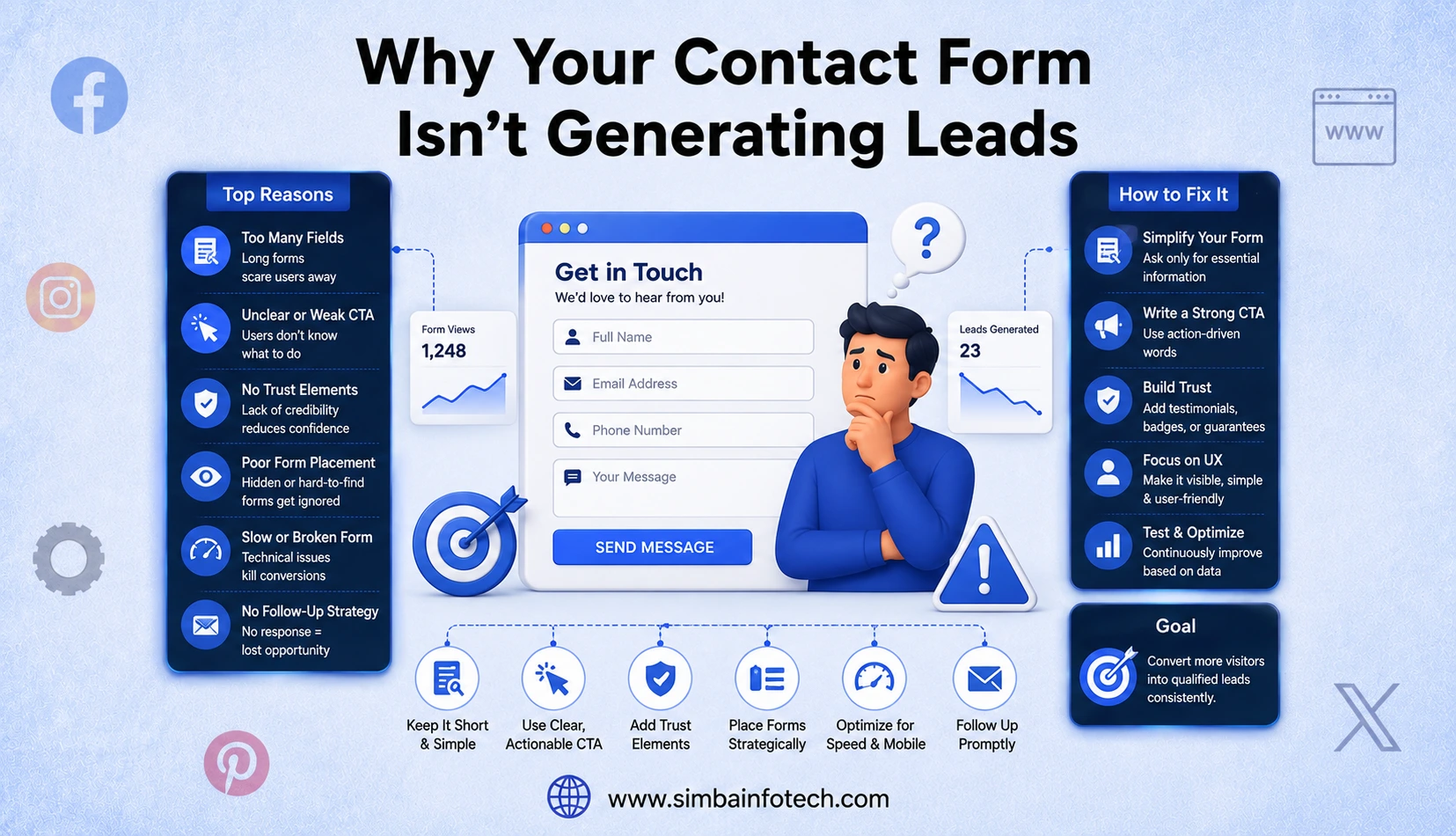
Your website may receive plenty of visitors, but if your contact form isn’t converting them into inquiries, you’re likely missing valuable business opportunities. A contact form is often the final step before a potential customer reaches out, making it one of the most important tools for lead generation. If it is difficult to use, poorly designed, or lacks trust, visitors may leave without taking action.
This is one of the most common problems the best digital marketing agency in Surat gets called in to fix, since a business can spend heavily on traffic and still lose leads at the very last step. This guide explains why your contact form may not be generating leads and shares practical strategies to improve conversions, enhance user experience, and turn more website visitors into loyal customers.
What Makes a Contact Form Important for Lead Generation?
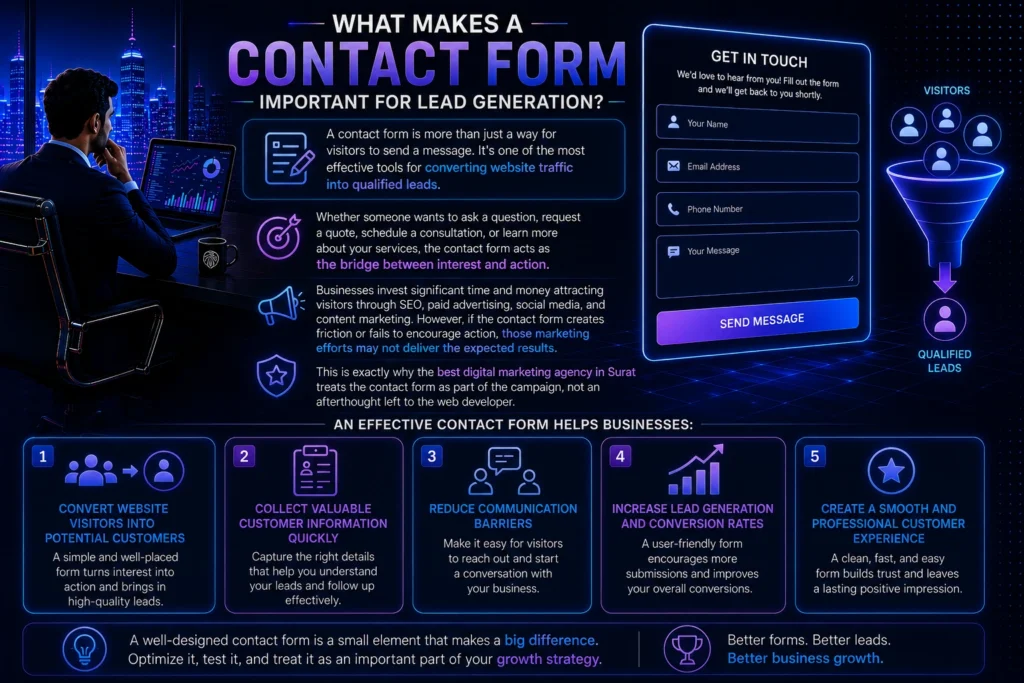
A contact form is more than just a way for visitors to send a message. It’s one of the most effective tools for converting website traffic into qualified leads. Whether someone wants to ask a question, request a quote, schedule a consultation, or learn more about your services, the contact form acts as the bridge between interest and action.
Businesses invest significant time and money attracting visitors through SEO, paid advertising, social media, and content marketing. However, if the contact form creates friction or fails to encourage action, those marketing efforts may not deliver the expected results. This is exactly why the best digital marketing agency in Surat treats the contact form as part of the campaign, not an afterthought left to the web developer.
An effective contact form helps businesses:
- Convert website visitors into potential customers
- Collect valuable customer information quickly
- Reduce communication barriers
- Increase lead generation and conversion rates
- Create a smooth and professional customer experience
How Contact Forms Turn Visitors into Leads
Every visitor arrives on your website with a different goal. Some are researching your services, while others are ready to make a purchase or request more information. A contact form provides a simple and direct way for these visitors to connect with your business without searching for phone numbers or email addresses.
A strategically placed contact form encourages users to take action at the exact moment they are interested. Instead of leaving your website to contact you later, a step many people never complete, they can submit their inquiry instantly.
A high-converting contact form should:
- Be short and easy to complete
- Ask only for essential information
- Include a clear and action-focused call-to-action
- Work seamlessly on both desktop and mobile devices
- Provide confirmation that the submission was successful
Why Every Business Website Needs an Optimized Contact Form
An optimized contact form can directly influence how many inquiries your business receives. Even businesses with high website traffic may struggle to generate leads if their forms are confusing, lengthy, or difficult to use.
A professionally optimized form builds trust, improves usability, and makes visitors feel confident about contacting your business. It also reduces frustration by eliminating unnecessary fields and ensuring a fast, user-friendly experience.
Key benefits of an optimized contact form include:
- Higher lead generation and better conversion rates
- Improved user experience across all devices
- Increased customer trust and credibility
- Faster communication between your business and potential customers
- Better return on your marketing spend
- More qualified inquiries with less effort from visitors
By treating your contact form as a key part of your website strategy rather than just another page element, you create more opportunities to convert interested visitors into loyal customers. This is precisely the kind of detail that separates a freelancer from the best digital marketing agency in Surat.
Common Reasons Your Contact Form Isn’t Generating Leads
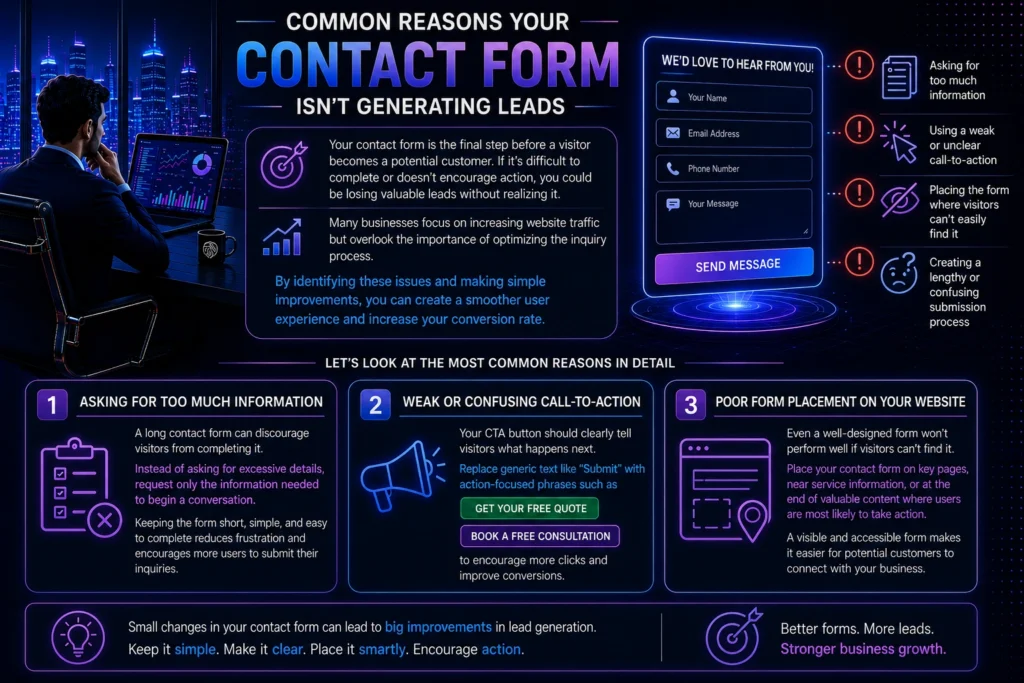
Your contact form is the final step before a visitor becomes a potential customer. If it’s difficult to complete or doesn’t encourage action, you could be losing valuable leads without realizing it. Many businesses focus on increasing website traffic but overlook the importance of optimizing the inquiry process.
Common reasons your contact form may not generate enough leads include:
- Asking for too much information
- Using a weak or unclear call-to-action
- Placing the form where visitors can’t easily find it
- Creating a lengthy or confusing submission process
By identifying these issues and making simple improvements, you can create a smoother user experience and increase your conversion rate.
1. Asking for Too Much Information
A long contact form can discourage visitors from completing it. Instead of asking for excessive details, request only the information needed to begin a conversation. Keeping the form short, simple, and easy to complete reduces frustration and encourages more users to submit their inquiries.
2. Weak or Confusing Call-to-Action
Your CTA button should clearly tell visitors what happens next. Replace generic text like “Submit” with action-focused phrases such as “Get Your Free Quote” or “Book a Free Consultation” to encourage more clicks and improve conversions.
3. Poor Form Placement on Your Website
Even a well-designed form won’t perform well if visitors can’t find it. Place your contact form on key pages, near service information, or at the end of valuable content where users are most likely to take action. A visible and accessible form makes it easier for potential customers to connect with your business. Placement mistakes like this are surprisingly common, and it’s usually the fastest fix a digital marketing agency makes on a client’s site.
How Too Many Form Fields Reduce Conversions
A long and complicated contact form can quickly discourage potential customers from reaching out. While collecting customer information is important, asking too many questions during the first interaction often creates unnecessary friction. Most visitors prefer a fast and simple process, and if completing the form feels time-consuming, they are more likely to leave without submitting it.
Common signs that your form needs simplification include:
- Too many mandatory fields
- High form abandonment rates
- Questions that aren’t immediately necessary
- Low inquiry rates despite good website traffic
Remember, the goal is to start a conversation, not collect every detail upfront.
Which Fields Are Essential?
Your contact form should request only the information needed to respond effectively. A well-optimized form should include:
- Basic contact information
- A message field for the inquiry
- One optional field, if it adds genuine value
Finding the Right Balance Between Data and Simplicity
A successful contact form balances your business needs with user convenience. Collect only essential information initially and gather additional details later if required. Use clear labels, minimize required fields, and ensure the form works smoothly across all devices. Regularly reviewing user behavior and testing different versions can help improve completion rates.
Why Your Contact Form Design Matters
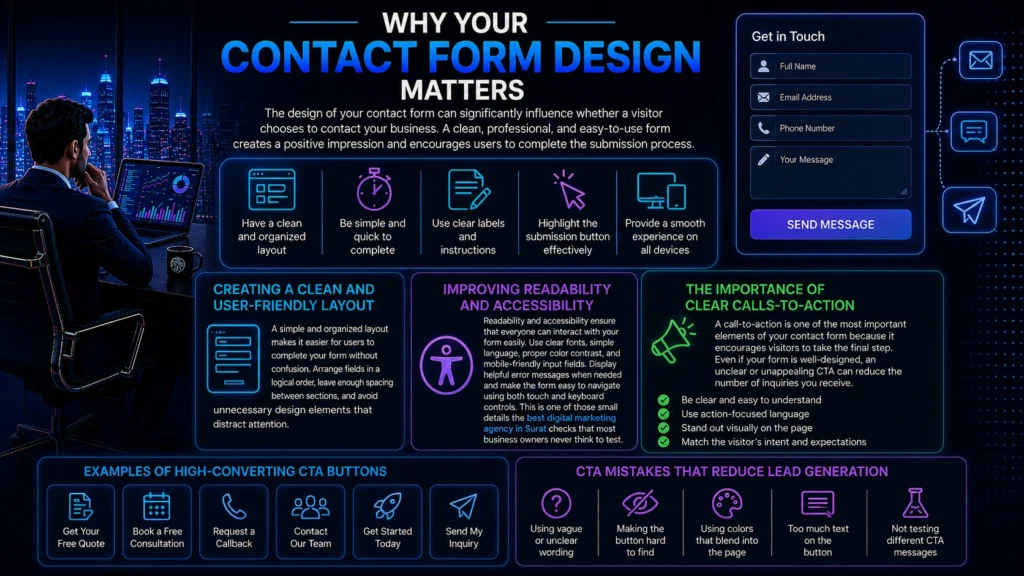
The design of your contact form can significantly influence whether a visitor chooses to contact your business. A clean, professional, and easy-to-use form creates a positive impression and encourages users to complete the submission process. On the other hand, a cluttered layout, confusing labels, or poor usability can cause potential customers to leave without taking action.
A well-designed form should:
- Have a clean and organized layout
- Be simple and quick to complete
- Use clear labels and instructions
- Highlight the submission button effectively
- Provide a smooth experience on all devices
Creating a Clean and User-Friendly Layout
A simple and organized layout makes it easier for users to complete your form without confusion. Arrange fields in a logical order, leave enough spacing between sections, and avoid unnecessary design elements that distract attention.
Improving Readability and Accessibility
Readability and accessibility ensure that everyone can interact with your form easily. Use clear fonts, simple language, proper color contrast, and mobile-friendly input fields. Display helpful error messages when needed and make the form easy to navigate using both touch and keyboard controls. This is one of those small details the best digital marketing agency in Surat checks that most business owners never think to test.
The Importance of Clear Calls-to-Action
A call-to-action is one of the most important elements of your contact form because it encourages visitors to take the final step. Even if your form is well-designed, an unclear or unappealing CTA can reduce the number of inquiries you receive.
A high-performing CTA should:
- Be clear and easy to understand
- Use action-focused language
- Stand out visually on the page
- Match the visitor’s intent and expectations
Examples of High-Converting CTA Buttons
- Get Your Free Quote
- Book a Free Consultation
- Request a Callback
- Contact Our Team
- Get Started Today
- Send My Inquiry
CTA Mistakes That Reduce Lead Generation
Small CTA mistakes can significantly impact your conversion rate. Avoid using vague wording, making the button difficult to find, or using colors that blend into the page. Regular testing of different CTA messages and button designs can help identify what generates the most inquiries.
How Mobile-Friendly Contact Forms Improve Lead Generation
A large percentage of website visitors browse and contact businesses using their smartphones. If your contact form isn’t optimized for mobile devices, you could lose valuable leads before users even complete their inquiry.
A mobile-friendly form should:
- Load quickly on all devices
- Use large, easy-to-tap fields and buttons
- Display properly on different screen sizes
- Minimize typing by requesting only essential information
Mobile Optimization Best Practices
Keep the layout simple, use responsive design, and ensure buttons are large enough for touchscreens. Enable the correct keyboard for fields like email and phone numbers, reduce unnecessary scrolling, and test the form regularly on different mobile devices.
Common Mobile Form Usability Issues
Poor mobile usability can reduce conversions and frustrate potential customers. Common issues include small input fields, difficult-to-read text, slow loading times, excessive scrolling, and forms that don’t fit the screen properly.
Building Trust with Your Contact Form
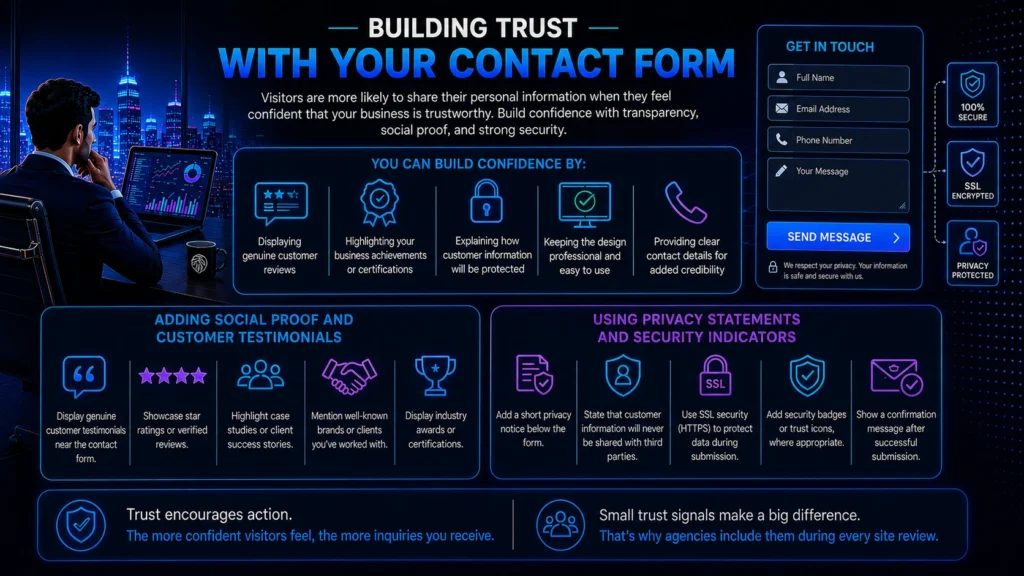
Visitors are more likely to share their personal information when they feel confident that your business is trustworthy. Even if someone is interested in your products or services, they may hesitate to fill out a contact form if they are unsure how their information will be used.
You can build confidence by:
- Displaying genuine customer reviews
- Highlighting your business achievements or certifications
- Explaining how customer information will be protected
- Keeping the design professional and easy to use
- Providing clear contact details for added credibility
Adding Social Proof and Customer Testimonials
Social proof reassures potential customers that others have had a positive experience with your business. Effective ways to add social proof include:
- Displaying genuine customer testimonials near the contact form
- Showcasing star ratings or verified reviews
- Highlighting case studies or client success stories
- Mentioning well-known brands or clients you’ve worked with
- Displaying industry awards or professional certifications where relevant
Using Privacy Statements and Security Indicators
Many users hesitate to submit a form because they worry about spam, unwanted calls, or misuse of their personal information. To increase trust, consider including:
- A short privacy notice below the form
- A statement that customer information will never be shared with third parties
- SSL security (HTTPS) to protect data during submission
- Security badges or trust icons, where appropriate
- A confirmation message after successful submission
Trust signals like these are easy to overlook, which is why a digital marketing agency will usually add them during a routine site review rather than waiting for a client to ask.
Common Technical Issues That Stop Form Submissions
Sometimes, the reason your contact form isn’t generating leads has nothing to do with its design or content. Technical issues can prevent inquiries from being submitted or delivered, causing you to lose potential customers without even realizing it.
Some common technical problems include:
- Forms that fail to submit
- Emails not reaching your inbox
- Error messages during submission
- Slow loading or unresponsive forms
- Plugin or website compatibility issues
Broken Forms and Email Delivery Problems
A form that appears to work but doesn’t send submissions can seriously impact your lead generation efforts. Email configuration issues, server errors, or outdated plugins are common causes of failed submissions. To avoid these problems:
- Test your form regularly
- Verify that confirmation emails are delivered
- Check spam folders for missing inquiries
- Keep plugins and website software updated
- Configure email settings correctly using reliable SMTP services if needed
Form Testing and Error Monitoring
Regular testing helps identify problems before they affect potential customers. Don’t assume your form is working simply because it appears correctly on the page. It’s also helpful to:
- Monitor submission success rates
- Review error logs regularly
- Test the form after website updates
- Check performance on both desktop and mobile devices
- Fix reported issues as quickly as possible
This kind of routine monitoring is exactly what the best digital marketing agency in Surat sets up for clients so a broken form never goes unnoticed for weeks.
How to Measure and Improve Contact Form Performance
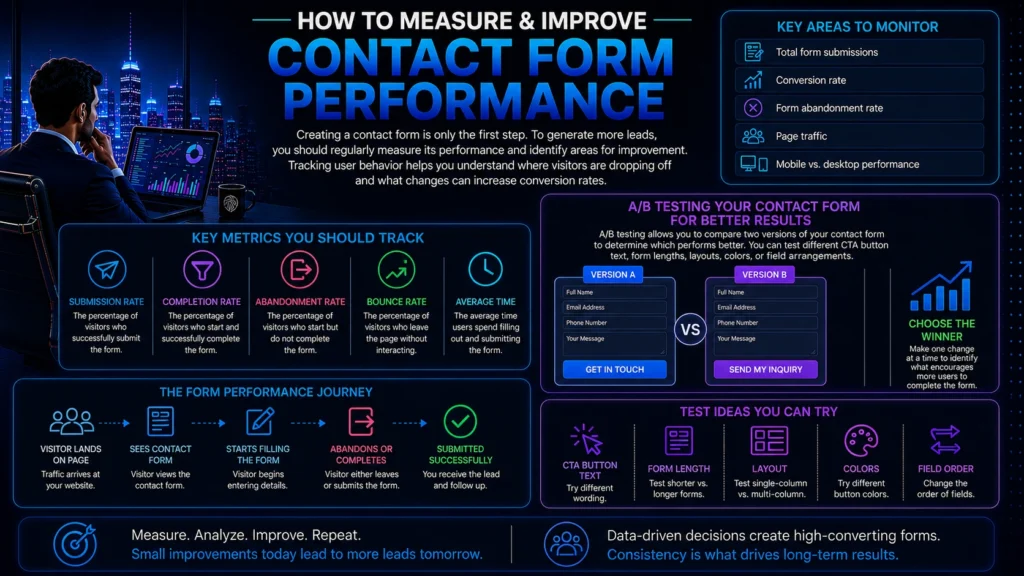
Creating a contact form is only the first step. To generate more leads, you should regularly measure its performance and identify areas for improvement. Tracking user behavior helps you understand where visitors are dropping off and what changes can increase conversion rates. This kind of ongoing measurement is a habit the best digital marketing agency in Surat builds into every campaign instead of treating the form as a one-time setup task.
Key areas to monitor include:
- Total form submissions
- Conversion rate
- Form abandonment rate
- Page traffic
- Mobile vs. desktop performance
Key Metrics You Should Track
Focus on important performance indicators such as submission rate, completion rate, bounce rate, and the average time users spend filling out the form.
A/B Testing Your Contact Form for Better Results
A/B testing allows you to compare two versions of your contact form to determine which performs better. You can test different CTA button text, form lengths, layouts, colors, or field arrangements. Making one change at a time helps you identify what encourages more users to complete the form.
Should You Fix It Yourself or Hire an Agency?
Many of the fixes in this guide, like shortening a form or rewriting a CTA, can be done in an afternoon. But others, like fixing broken email delivery, running A/B tests properly, or tying form performance back to your ad spend, take ongoing attention. This is usually the point where business owners start comparing the best digital marketing agency in Surat against trying to manage it alone.
A good agency should be able to show you:
- Before-and-after conversion numbers from real client forms
- How they test and monitor forms after launch
- Clear reporting tied to actual leads, not just traffic
- A process for fixing technical issues quickly
If you want to build these skills in-house first, the Digital Marketing Course and Website and Conversion Optimization Training at Simba Institute walk through form design, CTAs, and tracking in more depth.
Conclusion
A well-optimized contact form can make the difference between losing potential customers and generating valuable business leads. By keeping the form simple, using a clear call-to-action, improving mobile usability, building trust, and regularly testing its performance, you can create a smoother experience that encourages more inquiries.
Every small improvement contributes to higher conversion rates and better results. Your contact form should be treated as a powerful lead generation tool rather than just another website feature. Whether you fix it yourself or bring in the best digital marketing agency in Surat to handle it, the goal stays the same: turn more visitors into real conversations with real customers.
Key Takeaways
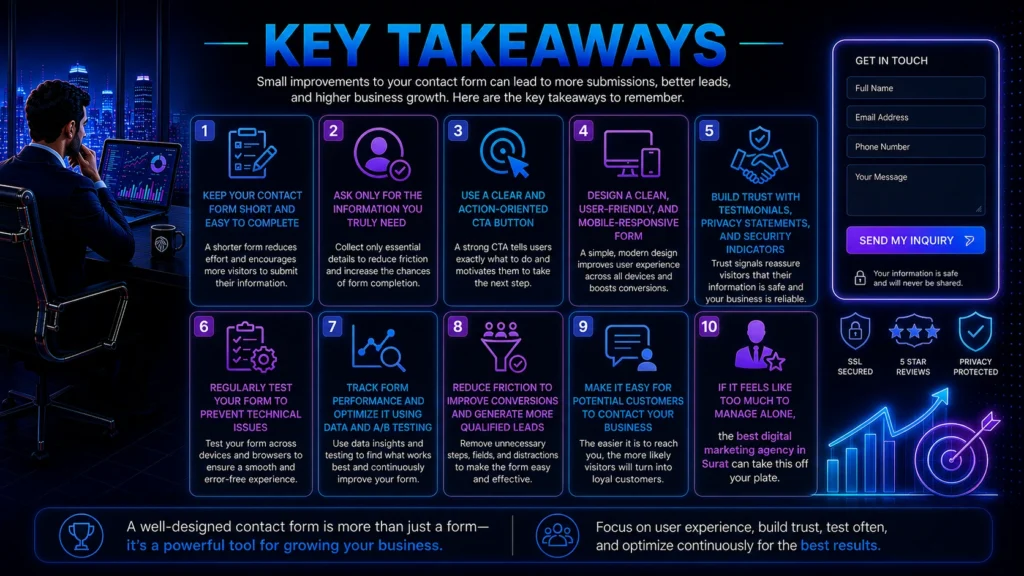
- Keep your contact form short and easy to complete
- Ask only for the information you truly need
- Use a clear and action-oriented CTA button
- Design a clean, user-friendly, and mobile-responsive form
- Build trust with testimonials, privacy statements, and security indicators
- Regularly test your form to prevent technical issues
- Track form performance and optimize it using data and A/B testing
- Reduce friction to improve conversions and generate more qualified leads
- Make it easy for potential customers to contact your business
- If it feels like too much to manage alone, the best digital marketing agency in Surat can take this off your plate
Frequently Asked Questions (FAQs)
1. Why isn't my contact form generating leads?
A poorly designed form, too many fields, weak CTAs, technical issues, or lack of trust can reduce inquiries. This is the first thing the best digital marketing agency in Surat checks during an audit.
2. How many fields should a contact form have?
Keep it simple with only the essential fields needed to start a conversation. A digital marketing agency will usually test this number rather than guess at it.
3. What is the best CTA for a contact form?
Use clear, action-oriented buttons like “Get a Free Quote” or “Book a Free Consultation.”
4. Why is a mobile-friendly contact form important?
Most users browse on mobile devices, so a responsive form improves user experience and increases conversions. The best digital marketing agency in Surat always checks mobile performance first, since most local traffic comes from phones.
5. How can I improve my contact form conversion rate?
Simplify the form, improve the design, add trust signals, use a strong CTA, and test its performance regularly.
6. Should I add customer testimonials near my contact form?
Yes. Genuine testimonials and reviews build trust and encourage more visitors to contact your business. A digital marketing agency will often place these strategically after testing a few positions.
7. How often should I test my contact form?
Test it regularly, especially after website updates, to ensure submissions and email notifications work correctly. Most digital marketing agencies build this into a monthly maintenance checklist.
8. Can the best digital marketing agency in Surat help fix a low-converting contact form?
Yes. A good agency will audit your form for field count, CTA wording, mobile usability, and technical delivery issues, then test changes against real conversion data instead of guessing.